The more complex our applications get, the harder it is to follow along our graph. Luckily for us, there is the concept of subgraphs that let us split our graph into parts that we can reuse.
For this post we create a minimalistic text writing pipeline that puts the quality checks into a subgraph. Let us see how we can do that.
Preparation
As with most LangGraph applications, we need an LLM, state and a few nodes. In this example we have two state objects, the ParentState is for the main workflow, while GateState is for the subgraph.
importreimportsysfromtypingimportTypedDictfromlangchain_openaiimportChatOpenAIfromlanggraph.graphimportSTART,END,StateGraphsys.stdout.reconfigure(encoding="utf-8")llm=ChatOpenAI(base_url="http://localhost:1234/v1",api_key="lm-studio",model="openai/gpt-oss-20b",temperature=0.1,)classParentState(TypedDict):topic:strdraft:strverdict:strclassGateState(TypedDict):draft:strtone_score:intlength_score:intfact_score:intverdict:strdefparse_int_or_default(text:str,default:int)->int:m=re.search(r"\d+",text)returnint(m.group())ifmelsedefaultdefwrite_draft(state:ParentState)->dict:print(f"[write_draft] Drafting blog post on: {state['topic']}")response=llm.invoke([("system","Write a 3-sentence opening paragraph for a blog post. Body only."),("user",state["topic"]),])return{"draft":response.content}defcheck_tone(state:GateState)->dict:print("[check_tone] LLM-rating draft tone ...")response=llm.invoke([("system","Rate the tone of the following text from 1 to 10. ""Respond with ONLY a single integer."),("user",state["draft"]),])return{"tone_score":parse_int_or_default(response.content,default=5)}defcheck_length(state:GateState)->dict:print("[check_length] Counting words ...")words=len(state["draft"].split())if30<=words<=80:score=10elifwords<30:score=max(1,10-(30-words))else:score=max(1,10-(words-80)//5)return{"length_score":score}defcheck_facts(state:GateState)->dict:print("[check_facts] LLM-rating factual plausibility (demo only, not real fact-checking) ...")response=llm.invoke([("system","Rate the factual plausibility of the following text from 1 to 10. ""Respond with ONLY a single integer. (This is a demo check.)"),("user",state["draft"]),])return{"fact_score":parse_int_or_default(response.content,default=5)}defaggregate_score(state:GateState)->dict:tone=state["tone_score"]length=state["length_score"]fact=state["fact_score"]avg=(tone+length+fact)/3print(f"[aggregate_score] tone={tone} length={length} fact={fact} avg={avg:.1f}")ifavg>=7:verdict="PUBLISH"else:dim_name,dim_score=min((("tone",tone),("length",length),("fact",fact)),key=lambdat:t[1],)verdict=f"REVISE: {dim_name} (score={dim_score}/10)"return{"verdict":verdict}defpublish_or_revise(state:ParentState)->dict:print("\n--- VERDICT ---")print(state["verdict"])print("--- /VERDICT ---")return{}
Create the subgraph
We create our subgraph the same way we create a regular graph in LangChain. A subgraph is a fully functional graph that we then put into another graph:
workflow=StateGraph(ParentState)workflow.add_node("write_draft",write_draft)workflow.add_node("quality_gate",gate_subgraph)workflow.add_node("publish_or_revise",publish_or_revise)workflow.add_edge(START,"write_draft")workflow.add_edge("write_draft","quality_gate")workflow.add_edge("quality_gate","publish_or_revise")workflow.add_edge("publish_or_revise",END)graph=workflow.compile()defmain()->None:topic=sys.argv[1]iflen(sys.argv)>1else"the productivity benefits of standing desks"graph.invoke({"topic":topic})if__name__=="__main__":main()
Run the graph and subgraph
We can now run our script that comes up with an idea and then runs it through the quality gate (the subgraph). At the end we see if this post is ready to publish or not:
$ python .\subgraphs.py

[write_draft] Drafting blog post on: the productivity benefits of standing desks
[check_tone] LLM-rating draft tone ...
[check_length] Counting words ...
[check_facts] LLM-rating factual plausibility (demo only, not real fact-checking) ...
[aggregate_score] tone=5 length=1 fact=1 avg=2.3

--- VERDICT ---
REVISE: length (score=1/10)
--- /VERDICT ---


$ python .\subgraphs.py

[write_draft] Drafting blog post on: the productivity benefits of standing desks
[check_tone] LLM-rating draft tone ...
[check_length] Counting words ...
[check_facts] LLM-rating factual plausibility (demo only, not real fact-checking) ...
[aggregate_score] tone=8 length=7 fact=7 avg=7.3

--- VERDICT ---
PUBLISH
--- /VERDICT ---
Visualising the subgraph
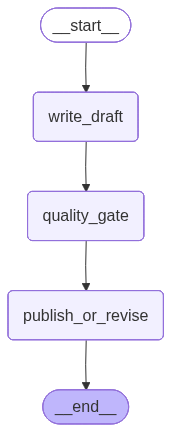
When we visualise our graphs as we did in post #327, we only get to see the nodes of our main graph:
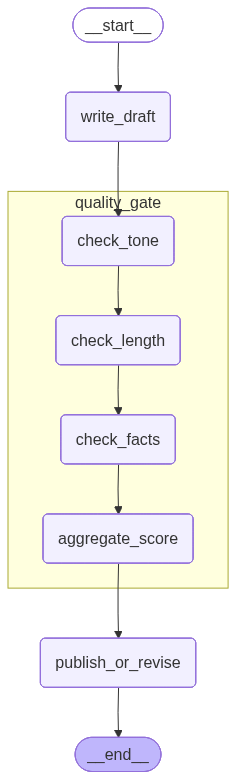
To see the subgraph, we need to pass the parameter xray=1 to the get_graph() function:
With this little change we see our subgraph in its entirety:
Next
We can split our graph into subgraphs, what allows us to be more flexible: we can reuse parts or develop them separately, while at the end they can be put together nicely. Next week we go a bit deeper into the reusability aspect when we find a solution for the raspberry test.