#335: Handle the Raspberry-Test in LangGraph
A common way to test the "quality" of an AI solution is to ask for how many r’s are in the word raspberry. LLMs are notoriously bad in such questions, but that does not mean we have to accept defeat with our AI application. Let us figure out how we can handle these types of tests.
Why are these tests useless?
A LLM does not store words and letters. Instead, all it knows are tokens, embeddings and a lot of statistics about the next token to choose from. With this knowledge base, there is simply no way to answer the question.
Why are these kinds of tests so popular? They are easy to do, and they nearly always give the desired result of a bad looking AI. The number of letters is mostly wrong, but there are even worse outcomes. Last month, Google’s AI Overview tool produced this mind-boggling bad answer:
User: "How many Ps are in Google?"
AI Overview: There are 2 “P”s in the word “Google”.
Let us see how we can prevent such terrible answers inside our LangGraph applications.
Create a reusable subgraph
A check for this kind of tests will be a good candidate for a reusable solution. In last week’s post we created a subgraph and we can build on top of this knowledge and add a little bit more code.
We crate our letter_counter module by putting the code in a file named letter_counter.py. We start with a regular expression to check for questions that we can answer with this module and use the function handles_letter_counter() to check the user input.
The function make_letter_counter() is our factory method that will build us a subgraph that wraps its helper functions to do the counting in Python and formats the answer. The parameters input_key and output_key help us to integrate this subgraph into the larger graph of our application.
The main method glues the LLM with our functions together and runs with the default questions about the raspberry if we do not pass another question:
We can run this script on its own to check if everything works as expected:
$ python .\letter_counter.py

[parse_question] LLM extracting (letter, word) from: 'how many r are in raspberry?'
[count_letter] Python counted 'r' in 'raspberry': 3
[format_answer] There are 3 'r's in 'raspberry'.

--- ANSWER ---
There are 3 'r's in 'raspberry'.
--- /ANSWER ---
Use the subgraph
In a different file we can now build our LangGraph application as usual and import our letter_counter module. We need the two functions make_letter_counter() and handles_letter_counter() for the routing and the counting.
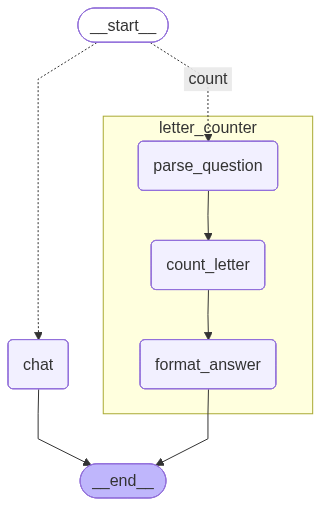
After connecting our LLM, we can initialise the letter_counter node and create a route() function that routes the traffic within a conditional edge inside our graph. We build our graph as we did before, and with the conditional edge we rout everything about counting letter to our letter_counter node, while everything else goes to the chat node that calls the LLM to answer our questions.
This gives us this graphical representation of our application:
We can now run our application and check if it can handle the raspberry and still gives useful answers on similar but different questions:
$ python .\subgraph_with_letter_counter.py
[route] -> count
[parse_question] LLM extracting (letter, word) from: 'how many r are in raspberry?'
[count_letter] Python counted 'r' in 'raspberry': 3
[format_answer] There are 3 'r's in 'raspberry'.

--- ANSWER ---
There are 3 'r's in 'raspberry'.
--- /ANSWER ---


$ python .\subgraph_with_letter_counter.py "how many calories in an apple?"
[route] -> chat
[chat] Answering with the raw LLM ...

--- ANSWER ---
A medium‑sized (about 182 g) apple contains roughly **95–100 calories**.
- Small apple (~149 g): ~80 cal
- Large apple (~223 g): ~115 cal

The exact number varies with variety, ripeness, and size, but most nutrition labels list about 95 kcal for a standard medium apple.
--- /ANSWER ---
Next
Since people will not stop using silly questions like the number of r's in raspberry, we better make sure that our solutions can handle it. As we saw in this post, it takes not much effort to prevent disastrous answers like the number of p's in Google – we just need to go the extra mile and create a reusable subgraph once and use it in our applications.
Next week we explore our options to turn our tools into a MCP server and use it with an LLM.