#333: Inspect and Rerun Workflows in LangGraph
When we switch from our hand-written long-term memory solution in last week's post to a pre-build SqliteSaver, we not only need less code, but we gain new options. One of the benefits of saving the whole state to a database is that we can inspect the current workflow and rerun them after we fixed a problem. Let us see how that works.
A reproducible failure
If we want to recover from a failure, we need to be able to produce one when it is convenient. The script we build in this post uses arguments to crash our workflow when we call it with start and otherwise does the job it should. The docstring at the top of the script gets reused when we call the script with the wrong parameters:
The reset parameter should only delete the database. That is why it is up here and not down in the main method.
Define the nodes
We initialise our LLM and then define three functions for a research workflow. They do nothing useful but help us to see that we can produce a failure and then resume it on the next run:
Build the workflow
For our SqliteSaver checkpointer we need a connection string to a database file. If that is done, we can build our workflow with the above defined nodes:
This creates a minimalistic graph:
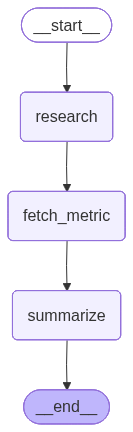
Interact with the workflow
In our main method we do all the interactions. The configuration has the thread_id, that we set to our fixed variable. In a production-ready application we would use a GUID, but for our demo we want to have a fixed value that we do not need to modify on every run.
When we pass start we invoke the workflow and catch the exception that we will get. If we pass inspect, we get the current state of the workflow with our thread_id and see what LangGraph all tracks. The last remaining option is resume that will skip those two parts and restarts the thread we specified:
Run it
When we run our script with the different parameters, we should get an output like this one:
$ python .\resume_failed.py
Resume a failed LangGraph workflow.

The first run intentionally crashes inside `fetch_metric`. The graph state up
through `research` is durable in the SQLite checkpointer, so the second run
picks up at `fetch_metric` and finishes — without re-calling the LLM in
`research`.

    uv run resume_failed.py reset      # delete resume_demo.sqlite
    uv run resume_failed.py start      # crashes mid-graph (by design)
    uv run resume_failed.py inspect    # print saved checkpoint + history
    uv run resume_failed.py resume     # picks up where the crash left off


$ python .\resume_failed.py start
[research] Calling LLM about: the productivity benefits of standing desks
[fetch_metric] Calling external metrics API ...
************************************************************
ERROR: Network error: timeout calling metrics API.
************************************************************

$ python .\resume_failed.py inspect
--- CURRENT STATE ---
checkpoint_id: 1f150897-ea42-65d5-8001-93fbcc39641d
next (pending): ('fetch_metric',)
values: {'topic': 'the productivity benefits of standing desks',
'research': 'Recent meta‑analyses indicate that standing desk interventions
reduce sedentary time by an average of 30\u202fminutes per day and are associated
with significant improvements in postural muscle activation patterns
(p\u202f<\u202f0.01).
Moreover, randomized controlled trials report modest but consistent gains in
self‑reported energy expenditure and alertness scores, suggesting that even brief
bouts of standing can enhance overall workplace productivity without compromising
task performance.'}

--- HISTORY (newest first) ---
[0] next=('fetch_metric',)  source=loop  values keys=['topic', 'research']
[1] next=('research',)  source=loop  values keys=['topic']
[2] next=('__start__',)  source=input  values keys=[]

$ python .\resume_failed.py resume
Resuming from saved checkpoint at fetch_metric ...
[fetch_metric] Calling external metrics API ...
[summarize] Calling LLM with research + metric ...

$ python .\resume_failed.py reset
Deleted resume_demo.sqlite.

--- SUMMARY ---
Recent meta‑analyses show that standing desk interventions cut sedentary time by
roughly 30 minutes a day and improve postural muscle activation patterns (p < 0.01).
Randomized controlled trials add that even brief bouts of standing modestly boost
self‑reported energy expenditure, alertness scores, and overall workplace
productivity—without hurting task performance. In fact, users can expect about a
12% increase in calorie burn simply by swapping to a standing desk.
--- /SUMMARY ---
Our first attempt failed because we did not specify one of the required parameters. When we then use the predefined sequence, we start a workflow and see it fail. We then inspect the state and resume it to finish the processing of our request. Since the state got persisted, the resumed workflow only goes through the steps we did not successfully finish, what may save us a lot of time.
Next
With the help of SqliteSaver we do not need a hand-written solution. Instead, we can use this approach and store not only our session memory, but the state of the graph itself in a SQLite database. That allows us to inspect the state should something go wrong.
Next week we see how we can build sub-graphs that help us better group larger workflows.