Last week, we created a simple LangGraph application as our starting point. In this post, we will look at different ways to manage control flow and how nodes can interact with each other. While this sounds even more boring than our last post, here is where things start to get interesting.
To keep the examples fast and understandable, we skip the LLM for this post. Feel free to add one for your examples.
Pass data between nodes
When we can pass data between nodes, we can specialise the work each node does. One node can do research; another node can create a summary. For our minimalistic example, we create a node that creates a random number. We then add another node that tells us the number and checks if the number is even or odd:
importrandomfromtypingimportTypedDictfromlanggraph.graphimportStateGraph,START,END# 1. Define the StateclassState(TypedDict):number:intresult_message:str# 2. Define the Nodesdefgenerator_node(state:State):"""Generates a random number between 1 and 100."""print("--- GENERATING Number ---")random_num=random.randint(1,100)print(f"The random number is {random_num}")return{"number":random_num}defprocessor_node(state:State):"""Determines if the number is even or odd and formats the message."""print("--- PROCESSING Number ---")num=state["number"]parity="even"ifnum%2==0else"odd"message=f"You entered {num}, it is {parity}."return{"result_message":message}# 3. Build the Graphworkflow=StateGraph(State)# Add nodesworkflow.add_node("generator",generator_node)workflow.add_node("processor",processor_node)# Connect nodesworkflow.add_edge(START,"generator")workflow.add_edge("generator","processor")workflow.add_edge("processor",END)# Compileapp=workflow.compile()# 4. Execute# We start with an empty dict because the generator creates the first valuefinal_output=app.invoke({"number":0,"result_message":""})print("\n--- FINAL OUTPUT ---")print(final_output["result_message"])
When we run our script, we may get an output that looks like this:
$ python pass_data_between_nodes.py

--- GENERATING Number ---
The random number is 83
--- PROCESSING Number ---

--- FINAL OUTPUT ---
You entered 83, it is odd.


$ python pass_data_between_nodes.py

--- GENERATING Number ---
The random number is 48
--- PROCESSING Number ---

--- FINAL OUTPUT ---
You entered 48, it is even.
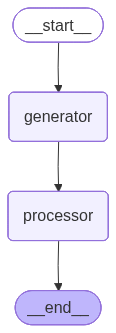
The graph we created now has two nodes between the special nodes __start__ and __end__:
Add conditions
We can create an if statement like function in our graph called a conditional edge. For that we need a function that makes the decision about what path to choose, and we need nodes we can branch out to. Instead of our direct wiring as we did with the example to pass data between nodes, we use the add_conditional_edges() function that needs the node we want to have as an input, the decision function and a map that points to the next node.
Make sure that the output of the decision function matches the key parameter in the route dictionary, while the value must match the node.
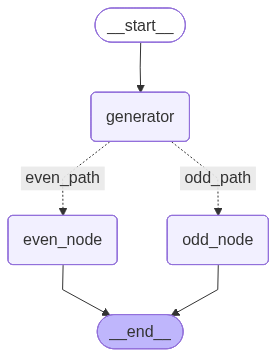
This little example starts with the generator node, then passes the output to the route_decision() function that calls either the even or the odd node:
importrandomfromtypingimportTypedDict,Literalfromlanggraph.graphimportStateGraph,START,END# 1. Define the StateclassState(TypedDict):number:intresult_message:str# 2. Define the Nodesdefgenerator_node(state:State):"""Generates a random number."""num=random.randint(1,100)print(f"--- GENERATED: {num} ---")return{"number":num}defeven_processor(state:State):"""Logic specifically for even numbers."""return{"result_message":f"You entered {state['number']}, it is even."}defodd_processor(state:State):"""Logic specifically for odd numbers."""return{"result_message":f"You entered {state['number']}, it is odd."}# 3. Define the Routing Logicdefroute_decision(state:State)->Literal["even_path","odd_path"]:"""Determines which node to visit next."""ifstate["number"]%2==0:return"even_path"return"odd_path"# 4. Build the Graphworkflow=StateGraph(State)# Add Nodesworkflow.add_node("generator",generator_node)workflow.add_node("even_node",even_processor)workflow.add_node("odd_node",odd_processor)# Define Edgesworkflow.add_edge(START,"generator")# Add Conditional Edges# Arguments: (Source Node, Routing Function, Mapping of function output to Node names)workflow.add_conditional_edges("generator",route_decision,{"even_path":"even_node","odd_path":"odd_node"})# Connect branch ends to the ENDworkflow.add_edge("even_node",END)workflow.add_edge("odd_node",END)# Compile and Runapp=workflow.compile()final_output=app.invoke({"number":0,"result_message":""})print(f"FINAL RESULT: {final_output['result_message']}")
The output can look like this:
$ python branching_function.py

--- GENERATED: 28 ---
FINAL RESULT: You entered 28, it is even.

$ python branching_function.py

--- GENERATED: 59 ---
FINAL RESULT: You entered 59, it is odd.
The graphical representation of our workflow looks like this:
Add loops
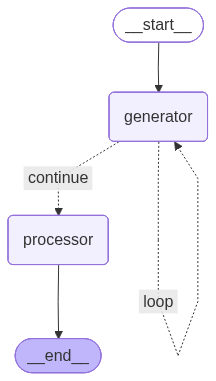
To create a loop in LangGraph we build on top of the conditional branches. But instead of calling nodes depending on a decision function, we use one of the routing entries in the dictionary to loop back to the node we came from:
importrandomfromtypingimportTypedDict,Literalfromlanggraph.graphimportStateGraph,START,END# 1. Define the StateclassState(TypedDict):number:intattempts:intresult_message:str# 2. Define the Nodesdefgenerator_node(state:State):"""Generates a random number and increments attempt counter."""num=random.randint(1,100)attempts=state.get("attempts",0)+1print(f"--- ATTEMPT {attempts}: Generated {num} ---")return{"number":num,"attempts":attempts}defprocessor_node(state:State):"""Final node reached only when an even number is found."""msg=f"Success! Found even number {state['number']} after {state['attempts']} attempt(s)."return{"result_message":msg}# 3. Define the Looping Logicdefcheck_if_even(state:State)->Literal["continue","loop"]:"""Check if we should proceed or try again."""ifstate["number"]%2==0:return"continue"return"loop"# 4. Build the Graphworkflow=StateGraph(State)# Add Nodesworkflow.add_node("generator",generator_node)workflow.add_node("processor",processor_node)# Define Edgesworkflow.add_edge(START,"generator")# Add the Looping Conditional Edgeworkflow.add_conditional_edges("generator",check_if_even,{"continue":"processor",# Path to the next node"loop":"generator"# Path back to itself})workflow.add_edge("processor",END)# Compile and Runapp=workflow.compile()# Initial stateinitial_state={"number":0,"attempts":0,"result_message":""}final_output=app.invoke(initial_state)print("\n--- FINAL RESULT ---")print(final_output["result_message"])
We can run our script, and it will loop until it finds an even number:
Whit these 3 basic concepts we can build workflows as complex as we need them. Our state object allows the interactions between the nodes, and the conditional edges do the branching and looping. Since this quickly can get complex, we will next week explore our options to crate graphs from our workflows.