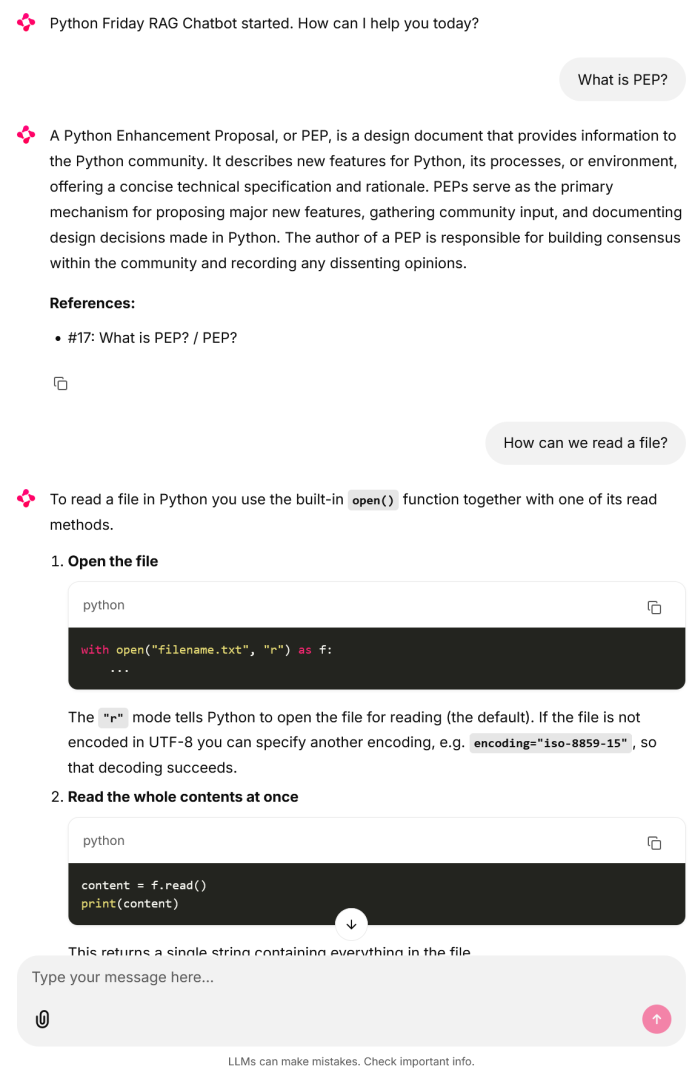
While the command line Python Friday RAG is nice, a user interface that looks more like other chatbots would be a nice enhancement. Luckily for us, there are a few tools we can use that do not need much code. Let us see how that can look like.
Installation
A quick and easy way to add a user interface to our RAG is Chainlit. This package needs only a tiny bit of code to integrate it, that is why we start with this package. We can install it with pip:
uvpipinstallchainlit
Add Chainlit
To integrate Chainlit into our RAG, we need these two methods to wire everything up:
importchainlitasclfromlangchain_openaiimportChatOpenAIfromlangchain_core.runnablesimportRunnableLambdafromlangchain_core.messagesimportHumanMessageimportchromadb# --- Chainlit UI Logic ---@cl.on_chat_startasyncdefstart():# Instantiate your assistant once per sessionassistant=RAGAssistant(collection_name="posts",db_path="./PythonFridayRAG.chroma")chain=assistant.get_chain()# Store the chain in the user sessioncl.user_session.set("chain",chain)awaitcl.Message(content="Python Friday RAG Chatbot started. How can I help you today?").send()@cl.on_messageasyncdefmain(message:cl.Message):# Retrieve the chain from the sessionchain=cl.user_session.get("chain")# Create an empty message to stream the response intomsg=cl.Message(content="")# Stream the responseasyncforchunkinchain.astream(message.content):# LangChain's ChatOpenAI returns BaseMessage objectsifhasattr(chunk,"content"):awaitmsg.stream_token(chunk.content)awaitmsg.send()
classRAGAssistant:def__init__(self,collection_name,db_path,model_name="openai/gpt-oss-20b"):# Initialize database internallyself.client=chromadb.PersistentClient(path=db_path)self.collection=self.client.get_collection(name=collection_name)# Initialize LLM internallyself.llm=ChatOpenAI(base_url="http://localhost:1234/v1",api_key="lm-studio",model=model_name,temperature=0.1)def_format_prompt(self,question):"""Internal method to query Chroma and build the string."""results=self.collection.query(query_texts=[question],n_results=5)context_string=""fori,(doc,meta)inenumerate(zip(results["documents"][0],results["metadatas"][0])):ref=meta.get("Reference","Unknown")context_string+=f"DOCUMENT ID: {i}\nREFERENCE LABEL: {ref}\nCONTENT: {doc}\n---\n"returnf"""### Instruction# Answer the user's question using ONLY the provided data in the "Context" section.# ### Constraints# 1. NO INLINE CITATIONS: Do not mention the source, reference title, or document ID within the body of your answer. Write the answer as a seamless narrative.# 2. STRICT GROUNDING: Use only the provided Context. If the answer is missing, say "I do not have enough information in the provided context."# 3. UNIQUE REFERENCES: At the very end of your response, provide a section titled "References:".# 4. DEDUPLICATION: In the "References:" section, list every unique REFERENCE LABEL that contributed to your answer. Even if multiple context blocks have the same label, list it only once.# - Format: " - {{reference}}"# ### Context# {context_string}# ### User Question# {question}# ### Answer"""defhandle_query(self,user_input):"""This matches the signature LangChain expects."""full_prompt=self._format_prompt(user_input)return[HumanMessage(content=full_prompt)]defget_chain(self):"""Builds the chain using the instance method."""returnRunnableLambda(self.handle_query)|self.llm
Run Chainlit
We can run Chainlit and start the web application with this command:
chainlitrunpf_rag_ui.py-w--port8080
This starts the Chainlit application on port 8080. If we do not specify a port, it will use port 8000.
Ask about Python Friday on the web interface
We can now use our browser and ask the same questions as before through a nice and responsive web interface:
Room for improvement
We now have a RAG that works with the posts of PythonFriday. The answers I got for my questions where good enough, so I do not need to change the embedding function for the time being. It may be a different story if you focus much more on code. Nevertheless, I suggest you first see what you get with the default function and only change it if it is needed.
We could add DiskCache to save a lot of work when multiple people ask the same question. That way we only would fetch the data and run it through the LLM once and not every time the same questions get asked. That can massively speed things up, but it also needs some additional effort to keep things in sync.
I currently use 5 results from Chroma. But we could experiment with more results, longer context size, a different LLM, and a change in the temperature to see how that influences the results we get from our RAG. So far, I did not do that and leave it to the reader to see what combination works best.
Next
With this post we finish our RAG adventure. Thanks to LangChain, building a RAG was an easy task and we could leverage the powerful tools that it offers. For the moment this concludes this topic for me. Next week we stay in LangChain and see how agents can help us to answer our questions.