Skip to content

#249: Migrate from WordPress to Markdown

With Material for MkDocs I found a valid alternative for WordPress. There is only one large obstacle left: How do we get the blog posts from WordPress to Markdown?

Export the posts

WordPress offers us a way to export our posts. To see the option, we need to log-in with an administrator account. In the Tools section we find the Export feature that allows us to export main part of our blog posts:
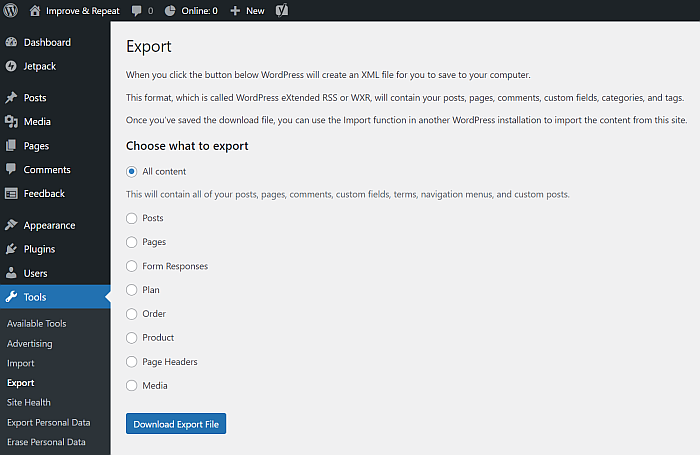
The export dialog let us specify what we want to export. Select the option All content.

This WordPress eXtended RSS file contains all our posts, but not the media files. We will fetch them in the next step.

Converter the posts

As so often, there are many tools that claim to convert your WordPress posts to Markdown. I had to test a few until I found wordpress-export-to-markdown that did the whole job.

If you do not have a full Node.js environment, you do not need to install it. Instead, we can use this docker-compose.yaml file to create a dev container:

1
2
3
4
5
6
7
8
9
services:
  app:
    image: node:20-alpine
    volumes:
      - type: bind
        source: ./data
        target: /workspace
    working_dir: /workspace
    command: sh -c 'while true; do sleep 30; done'

Crete the folder data next to the YAML file and put the WordPress export file into that new folder.

We can start the container with this command:

docker-compose up

This will fetch the image, creates a container with Node.js for us and makes our exported WordPress file accessible inside the container. We can now connect to the container and run this command to convert our blog posts to Markdown:

npx wordpress-export-to-markdown

After we answered a few questions on how we want to export our posts, the tool starts its work. It may take a few minutes, depending on how many images it needs to download. When it is done, we should have a structure like this one:

1
2
3
4
5
6
7
8
.
+---2020-01-03-python-friday-1-lets-learn-python
|   |   index.md
|   |
|   \---images
|           PythonSetup.png
|           PythonSetup_PathLenghtLimit.png
...

Improve with a script

While we now have Markdown files, they do not match everything MkDocs expects. We can fix that and optimise a few things along the way.

I want to use a different folder structure, that puts the images next to the Markdown files and renames the index.md file to something I know what is inside. This should give us a structure like this:

1
2
3
4
5
6
7
.
+---2020
|   +---1-lets-learn-python
|   |       1-lets-learn-python.md
|   |       PythonSetup.png
|   |       PythonSetup_PathLenghtLimit.png
...

Inside the Markdown file, we can fix these points:

  • Change the date from a string to a date object and add the time of the publication
  • Remove Python Friday from the titles
  • Set a language for the code samples
  • Turn the links to Python Friday posts into relative links
  • Replace the recuring reference to the series with a <!-- more --> tag
  • Fix the links to the images that are no longer in an image folder

To get all those changes done, I wrote this little script:

import os
import sys
import shutil
import re

link_to_blog = re.compile(r'\(https://improveandrepeat.com/(.*?)\)')
year_and_title = re.compile(r'(?P<year>\d{4})/\d{2}/python-friday-(?P<title>\S+)/?')

def collector(folder: str) -> set:
    result = set()
    for root, dirs, files in os.walk(folder):
        # print(f"{root}, {dirs}, {files}")
        for dirName in dirs:
            if 'images' == dirName:
                continue
            result.add(dirName)
    # print(result)
    return result


def transform_folder(folder: str, source: str, target: str) -> None:
    print(folder)

    year = folder[0:4]
    print(f"Year: {year}")
    new_name = folder[25:]
    print(f"New name: {new_name}")

    new_folder_path = target + os.sep + year + os.sep + new_name + os.sep 
    print(f"New folder path: {new_folder_path}")

    with open(f"{source}{os.sep}{folder}{os.sep}index.md", 'r', encoding='utf-8') as file:
        post_orig = file.read()
    post_fixed = cleanup_post(post_orig)
    os.makedirs(new_folder_path)
    with open(f"{new_folder_path}{new_name}.md","w+", encoding='utf-8') as f:
        f.writelines(post_fixed)

    image_folder = f'{source}{os.sep}{folder}{os.sep}images'
    if os.path.isdir(image_folder):
        shutil.copytree(image_folder, new_folder_path, dirs_exist_ok=True)


def cleanup_post(input: str) -> str:
    output = []
    count_code_blocks = 0
    lines = input.split('\n')
    for line in lines:
        if line.startswith("date:"):
            line = line.replace("\"", "")
            line = f"{line} 20:00:00"

        if line.startswith("```"):
            if count_code_blocks % 2 == 0:
                line = line.replace("```", "``` py3")
            count_code_blocks += 1

        if line.startswith("This post is part of my"):
            line = "<!-- more -->"        

        if line.startswith("title:"):
            line = line.replace("Python Friday #", "#")

        if "(" in line:
            line = line.replace("(", "(")

        line = make_link_relative(line)
        line = make_link_relative(line)
        line = make_link_relative(line)

        output.append(line)
    full_post = "\n".join(output)
    if "<!-- more -->" not in full_post:
        full_post = full_post.replace("##", "<!-- more -->\n##", 1)

    return full_post


def make_link_relative(line):
    matches = link_to_blog.search(line)
    if matches and "/python-friday-" in matches.group(0):
        print(f"work on {matches.group(0)}")
        post_part = matches.group(1)
        parts = year_and_title.search(post_part)
        year = parts.group("year")
        title = parts.group("title")
        title = title.replace("?swcfpc=1", "")
        if ")" in title:
            title = title.replace(")", "")
        if "/" in title:
            title = title.replace("/", "")
        if "#" in title:
            title = title[:title.index("#")]
        line = line.replace(matches.group(0), f"(./../../{year}/{title}/{title}.md)")
    return line


if __name__ == "__main__":
    args = sys.argv[1:]
    source = args[0]
    target = args[1]
    print(f"transform_posts runs with {source} -> {target}")

    folders = collector(source)
    for folder in folders:
        transform_folder(folder, source, target)

When we point the script to the output folder of our converter tool, it goes through the posts, makes all the changes and puts them into the desired folder structure.

Load into MkDocs

We can take the year folders from our output and add them to our docs/posts folder of our MkDocs blog. We can run the preview feature of MkDocs, and it will tell us if there is a problem with our converted posts:

mkdocs serve

It took me a few iterations to get everything right. But thanks to the Python script, it did not cost much time to retry the transformation.
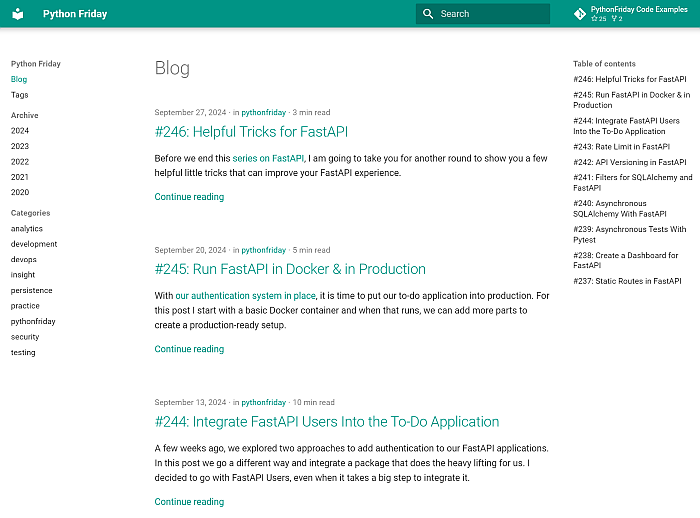
The posts are now inside the MkDocs blog.

Things to fix by hand

The transformation script did a great job and fixed most problems. However, some points require a manual change. The most notable would be the highlighted lines in the code samples and the improvement of the categories and tags. That cannot be automated and takes time.

Next

With this approach we got our HTML formatted blog posts out of WordPress and into the Markdown flavour we need for MkDocs. There are a few additional tasks we need to take care of, but before we tackle them, we celebrate the 250th post of Python Friday.