#330: Selective Approval With LangGraph
Last week we created a basic LangGraph example for the human-in-the-loop pattern. We ended up with a solution that run our tools but only after we approved the run. While this works, it gets cumbersome in no time. Especially when we have many tools and most of them are safe to use.
In this post we use a policy-based approach that allows us to create a list of safe tools for that we do not need a manual intervention. Let us see how we can build that.
Some dummy tools
To make the distinction between tools that need a manual approval and those who do not, we need a few tools. For this post we use 3 dummy tools with hard-coded return values to focus on the tool call and not their implementation. We need a few imports, our LLM and then we can define our tools:
The last part is important. In our SAFE_TOOLS list go the tools we do not want to ask the user for permission. If we build it that way, newly added unsafe tools will not fall through our safety net. This is our policy that tells our application what is safe and what is not. It does not look like much, but it is a massive improvement.
Define the nodes
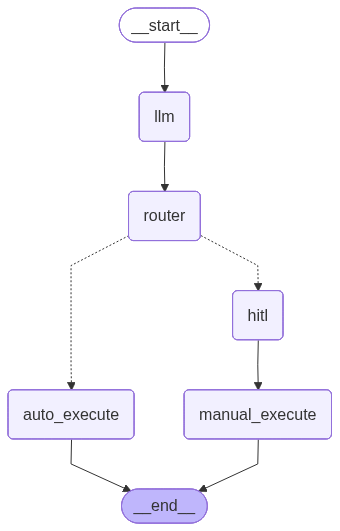
We create a dedicated LLM node that will check the user input and find the matching tool. In our router_node we make the decision if the tool is safe to use or if we need to hand it over to the hitl_node to check for permissions. We end the node definition with a tool_node that will do the tool call:
We get all the manual intervention nicely encapsulated inside hitl_node. That gives us a more reusable design than what we created last week.
Define the graph
We can now build our graph and use the above defined nodes:
This gives us a graph that looks like this:
Glue code
We finish our implementation with this glue code to wire everything together:
We have hardcoded examples in this demo, but you can accept the input directly from the user.
Run the improved graph
When we now run our script, we should end up with the call to the weather tool without any manual checks while the other two tools require permissions:
=== User ===
What's the weather in San Francisco?

=== LLM selected ===
get_weather
{
  "city": "San Francisco"
}

=== Router ===
get_weather -> auto_execute

=== Final Messages ===

--- HumanMessage ---
What's the weather in San Francisco?

--- AIMessage ---


--- ToolMessage ---
The weather in San Francisco is sunny and 75°F.

============================================================

=== User ===
Translate 'Hello world' to Spanish.

=== LLM selected ===
translate_text
{
  "text": "Hello world"
}

=== Router ===
translate_text -> hitl

=== HITL ===
Tool: translate_text
Args: {'text': 'Hello world'}
Proceed? (y/n): y

Approved.

=== Final Messages ===

--- HumanMessage ---
Translate 'Hello world' to Spanish.

--- AIMessage ---


--- ToolMessage ---
Spanish translation of 'Hello world': 'Hola mundo!'

============================================================

=== User ===
Summarize this article: Artificial intelligence is rapidly transforming
industries...

=== LLM selected ===
summarize_article
{
  "article": "Artificial intelligence is rapidly transforming industries,
  reshaping how businesses operate and innovate. From healthcare to
  finance, AI-driven analytics and automation are enhancing decision-making,
  improving efficiency, and unlocking new revenue streams. Companies that
  adopt AI technologies can gain a competitive edge by streamlining
  processes, personalizing customer experiences, and predicting market
  trends. However, challenges such as data privacy concerns, workforce
  displacement, and ethical considerations must be addressed to ensure
  responsible implementation. The future of AI promises continued growth,
  but success hinges on strategic integration, robust governance frameworks,
  and ongoing investment in talent development."
}

=== Router ===
summarize_article -> hitl

=== HITL ===
Tool: summarize_article
Args: {'article': 'Artificial intelligence is rapidly transforming
industries, reshaping how businesses operate and innovate. From
healthcare to finance, AI-driven analytics and automation are enhancing
decision-making, improving efficiency, and unlocking new revenue streams.
Companies that adopt AI technologies can gain a competitive edge by
streamlining processes, personalizing customer experiences, and
predicting market trends. However, challenges such as data privacy
concerns, workforce displacement, and ethical considerations must be
addressed to ensure responsible implementation. The future of AI promises
continued growth, but success hinges on strategic integration, robust
governance frameworks, and ongoing investment in talent development.'}
Proceed? (y/n): y

Approved.

=== Final Messages ===

--- HumanMessage ---
Summarize this article: Artificial intelligence is rapidly transforming
industries...

--- AIMessage ---


--- ToolMessage ---
Summary: Artificial intelligence is rapidly transforming industries, ...
A tiny detail that may surprise you is the long text we now have that we shorten. This comes from the llm_node that generates more text to our example without us needing to ask for it. The LLM is back at generating text, something it does all the time if we do not tell it otherwise.
Next
With this little addition we only need to give permission to the tools we do not think are safe. By keeping a list of safe tools, new (dangerous) tools cannot just slip through and do something we do not want them to. Next week we look at memory and how we can integrate it into LangGraph.