#295: A Simple Strategy to Tackle Errors
Sometimes all you want to do is a quick update of a Python package and you run into a learning opportunity. I had this experience many times, and while that is frustrating at the time, it usually ends up with me better understanding the tools I use. Let us take a failed update of MkDocs as an example on what to do if we run into an error after updating a package.
The goal and the obstacle
I tried updating Material for MkDocs to the latest version, but ended up with this error message when I tried to build my blog:
1. Read the exception message
The trick of reading the exception message is that we often find a good hint or even a summary at the end of the stack trace. In this case MkDocs could not find the image .icons/simple/css3.svg. But where do I use this icon? And what changed in Material for MkDocs that this error shows up after the upgrade?
Sometimes the stack trace shows us a clear point where the problem happened. Here this step did not help much, then everything pointed to locations inside the MkDocs package that I do not control.
2. Check the issues on GitHub
If you use an open-source project, your best bet is to go to the GitHub project page and check the issue tracker. In projects with an active user base a problem like this should be noticed quickly and result in a bug report.
While this is often the end of the hunt for the source of a problem, this time I had no luck. There was no bug report that matched my problem and nothing else that could have anything to do with this kind of errors.
The lack of bug reports weeks after the release of a new version is usually a good indicator that the problem is somewhere in your part. But before we dive into that, let us check another helpful part of GitHub.
3. Check the code changes
With open-source packages we can usually find the code and even the exact diffs between releases. In GitHub we can go to the releases and select on the one we have a problem with the older version that worked for us:
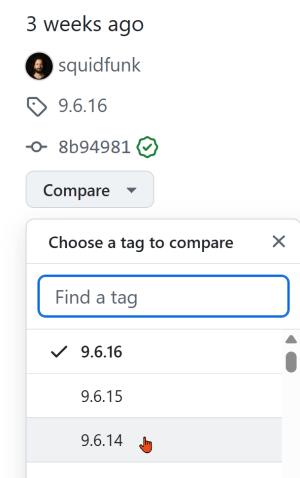
This gives us a detailed list of all the changes that happened between two releases. Sometimes we are lucky, and we can see that something changed that we need to apply in our application. In other occasions we may identify a dependency that could have an impact on our problem. But this time we did not find anything at all. It is now time to take another approach.
4. Create a minimal example
By now we figured out that there is no general problem and no obvious code change that could lead to our symptoms. It is now time to dig deeper into the error and start with a minimal example that allows us to reproduce the problem.
For my case I created a new folder and run this command to create a minimalistic site:
Then I tried to run the blog, what worked. That shows us that there is no machine-specific problem that prevents MkDocs from running. While the list of things that are not the problem grows, we are not yet able to find the source of our error.
5. Add to the minimal example until it breaks
We now can add our original configuration and see what happens. Maybe it breaks right away, maybe it shows another error about missing files. This is now the cumbersome part in which we add just enough to get rid of any new error message until we can reproduce the error message we initially got after the package update.
In my case it took a few additional files I had to copy over, but then the initial error message showed up as I copied this part of the original configuration file:
That part helps with custom icons for tags I initially copied from an example of the documentation. But since I do not need this feature, I just got rid of this section.
And after this change, I could run my blog without any errors on the current version of Material for MkDocs. Success!
Conclusion
Knowing what exactly you want to do and what error message this gives is the starting point for my simple strategy to tackle errors. The 5 steps are a guideline I follow because it helped me a lot in the past. Even better, this approach is not limited to package updates or Python, you can use it with any error message you get.
Try it and modify the steps as it adds value for you. After all, we want to solve a problem and not follow a strict process to the last dot.