#277: Access Local LLMs Through LM Studio
Machine learning is the hot topic of the day, especially Large Language Models (LLM). Despite the hype, my experience with them has been mixed. Sometimes they provide great help on the first try, but often the result needs significant rework or is completely wrong. In this post we do the groundwork to quickly try a lot of local LLMs to find one that offers a net benefit for us. It will not necessarily be a durable solution, but we can hit the ground running and get feedback before we spend all the time to run the wrong model on our local machine.
Install LM Studio
We can install LM Studio for Windows, Linux or Mac (on M-processors). We find the installer on the web page and can click through it to install LM Studio. There are no surprises or decisions we need to take, agreeing to the terms and conditions before we click ahead with Next is all it takes.
After the installation we should see this start screen of LM Studio:

Install a model
We can look at the online model catalog and get a quick idea what the model is for. When we open the details, we learn a bit more about the model and we can access the Use in LM Studio button to download that model:

We need to agree to install that model and then wait a bit. Some models are small and downloaded quickly, while others are big and take time.
We can access the same list of models directly from within LM Studio. All we need to do is to click into the LM Runtimes button next to the logo in the top bar. There we can search for a model and download it.
Play with the model
After the download finished, we can load the model and explore it inside LM Studio. We find an input form that works like most AI interfaces. We enter our question and then we get a result:
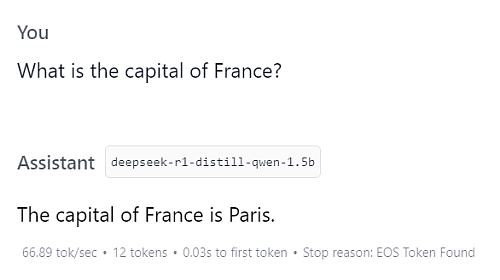
How long we need to wait on an answer depends on the model, our hardware and the optimisations we have in place. Do not give up if the model currently is too slow for your use case. We can later go through some optimisations and speed things up.
Start the server
On the Developer tab we see right at the top if the model is running and on what address we can access it:

If this is not the case, make sure that you load a model first and then move the switch to run the server.
Access the model through Python
To access the server of LM Studio, we can use the OpenAI client. Before we can use it, we need to install it (best through uv and in a virtual environment):
We can now create a minimal script based on the package documentation and modify it slightly to access our local server:
When we run this script, we get an output like this one for the DeepSeek R1 Distill Qwen 1.5B GGUF model:
<think>
Alright, I need to figure out what the Zen of Python is. I remember hearing
the term before, but I'm not entirely sure about the specifics. Let me start
by recalling if I've heard it mentioned anywhere else.

I think it's a set of principles or guiding ideas for Python programming.
Maybe someone named Martin Grumml or others wrote it down. But I can't
recall who exactly. Alternatively, perhaps it refers to some fundamental
concepts in Python that are considered foundational.

I remember something about using single letters for things like variables,
methods names, classes, etc. That seems important. It's called the
Single-Letter Variable Convention. So maybe that's part of the Zen.

Another thing I recall is how Python uses indentation and whitespaces
without requiring new lines. This makes writing code cleaner and reduces
errors. Maybe that's another principle from the Zen.

Also, I think about readability. Python allows for single-line functions,
but it still maintains a level of clarity through indentation. So maybe the
Zen emphasizes that balance between conciseness and readability.

I'm not sure if there are other principles mentioned in the Zen. Perhaps
something like using built-in types or leveraging operator overloading?
Or maybe it's about the use of the dictionary data structure?

Wait, I think one part of the Zen is to use a single letter for things
like variables, methods names, and so on. That helps in making code concise
and readable.

Another idea is that Python treats all strings as sequences, which simplifies
many operations. Maybe that's another point from the Zen.

I'm also trying to recall if there's something about using 'as' for aliasing
objects or perhaps 'in' for membership testing. Or maybe it's about using
exceptions in a way that emphasizes error handling.

But honestly, I'm not fully remembering all the points. So perhaps the Zen
of Python is a collection of guiding principles that aim to make Python
programming more readable and maintainable by following certain conventions.

I should probably look up the specific terms mentioned in the Zen to get a
clearer picture, but since I can't access external resources right now, I'll
have to rely on my memory. It seems like it's centered around these key
concepts: variable names, single-letter rules for class attributes,
indentation, readability, and the dictionary structure.

So putting it all together, the Zen of Python is likely a set of principles
that emphasize clarity, conciseness, and maintainability in Python
programming by establishing certain conventions and practices.
</think>

The "Zen of Python" is a collection of guiding principles aimed at making
Python code more readable, concise, and maintainable. It emphasizes several
key points:

1. **Single-Letter Variable Names**: This principle suggests using single
letters for variables, method names, and class attributes to keep the code
clean and readable.

2. **Indentation and Whitespace**: Python allows for single-line functions
but still maintains readability through proper indentation and use of
whitespace without new lines.

3. **Readability and Indentation**: The Zen emphasizes balancing conciseness
with clarity by using a single line of code where possible, while maintaining
readable structure through consistent indentation.

4. **Dictionary Structure**: Python's dictionary data type is fundamental to
the language, as it allows for efficient storage and retrieval of key-value
pairs.

These principles together form a guiding framework that encourages developers
to write clean, maintainable, and readable Python code by following these
conventions.

Model: deepseek-r1-distill-qwen-1.5b
Switch the model
If we want to try the Granite 3.2 8b model, we go back into LM Studio, download the model and load it. After restarting the server, we can run our script from above again and it should run now against the Granite model and give us a different output than we got with the other model:
The "Zen of Python" refers to a collection of 19 aphorisms or guiding
principles for writing computer programs, proposed by Tim Peters. These
principles are included in the Python community as an Easter egg accessible
via `import this` in a Python shell. Here they are:

 ```python
>>> import this
The Zen of Python, by Tim Peters

Beautiful is better than ugly.
Explicit is better than implicit.
Simple is better than complex.
Complex is better than complicated.
Flat is better than nested.
Sparse is better than dense.
Readability counts.
Special cases aren't special enough to break the rules.
Although practicality beats purity. Errors should always be gracefully handled.
If the implementation is hard to explain, it's a bad idea.
If the code is correct, it is simple.
The most beautiful thing you've ever seen was probably someone else's code.
Though not everyone can become a great artist, a grounding in the arts will
help anyone appreciate with a deeper understanding how extraordinary is what
we regard as commonplace.
 ```

Model: granite-3.2-8b-instruct
Gain insights
We have now everything in place to quickly try a model and access it from Python. We can modify the context to match our use case, refine the questions we want to ask or change the settings inside LM Studio.
It is now up to us to find a useful model and play with the options until we find a model that works for us.
Next
With our small set-up we can explore a wide range of LLM and test them with our relevant questions. Keep an eye on the disk space, then with models of 40GB or more that may run out quickly. Next week we optimise our little script to talk to an LLM so that we get faster feedback.